

5 Best Photo Editing Software in 2026 for Creators and Professionals

Today, photo editing software helps photographers improve lighting, colors, and details quickly. Modern tools also use AI to speed up complex adjustments.
Because visual quality matters more than ever, editing software has become essential for photographers and editors. Choosing the right tool can improve workflow and produce more professional images.
Below are five of the best photo editing software options available in 2026.
1. Adobe Photoshop
Adobe Photoshop remains the most powerful and widely recognized editing software. For decades, professionals have relied on Photoshop for advanced image manipulation.
Today, the software includes cutting-edge AI features that simplify complex editing tasks. For example, the Generative Fill tool allows users to add or remove elements using simple prompts.
Additionally, Photoshop provides unmatched control through its layer-based editing system. Editors can combine multiple images, adjust colors precisely, and perform detailed retouching.
Because of these capabilities, Photoshop is widely used in advertising, photography, and graphic design.
Key features include:
- Advanced layer editing tools
- AI Generative Fill and object removal
- High-end retouching capabilities
- Extensive plugin support
Although Photoshop requires some learning, it offers unmatched creative flexibility.

2. Adobe Lightroom
While Photoshop focuses on complex editing, Adobe Lightroom specializes in photography workflows. It helps photographers organize, edit, and export large photo collections efficiently.
One major advantage of Lightroom is its non-destructive editing system. This means original photos remain unchanged during the editing process.
Moreover, Lightroom offers powerful batch editing features. Photographers can apply adjustments to hundreds of images at once.
Recent updates also introduced advanced AI tools. For instance, Lightroom can automatically detect skies, subjects, and backgrounds.
These capabilities save photographers significant editing time.
Key features include:
- RAW photo editing tools
- AI masking and subject detection
- Cloud synchronization across devices
- Efficient photo organization system
Because of its streamlined workflow, Lightroom is widely used in event, travel, and real estate photography.

3. Luminar Neo
Luminar Neo has gained popularity because of its strong AI automation tools. Unlike traditional editing software, it focuses on simplifying complicated adjustments.
For example, the program can automatically adjust lighting in different parts of an image. It also offers advanced sky replacement and atmosphere effects.
Another unique feature is AI Relight, which adjusts lighting depth inside photos. This feature allows editors to enhance foreground and background lighting separately.
Furthermore, Luminar Neo includes generative AI tools for object removal and image expansion.
These tools make creative editing faster and more accessible.
Key features include:
- AI sky replacement
- AI lighting adjustments
- Generative object removal tools
- Portrait enhancement features
Luminar Neo works particularly well for landscape, travel, and creative photography.

4. Topaz Photo AI
Topaz Photo AI focuses primarily on improving image quality. It uses machine learning to enhance photos automatically.
Many photographers use this software to repair images captured in difficult conditions. For example, it can sharpen blurry photos or reduce heavy image noise.
Another impressive capability is AI upscaling. This allows low-resolution images to be enlarged without losing quality.
Because of this, Topaz Photo AI is often used alongside other editing software. Photographers frequently process images in Lightroom first, then enhance them with Topaz.
Key features include:
- AI noise reduction
- Automatic sharpening tools
- High-quality image upscaling
- Face recovery technology
Topaz Photo AI is especially valuable for wildlife, sports, and low-light photography.

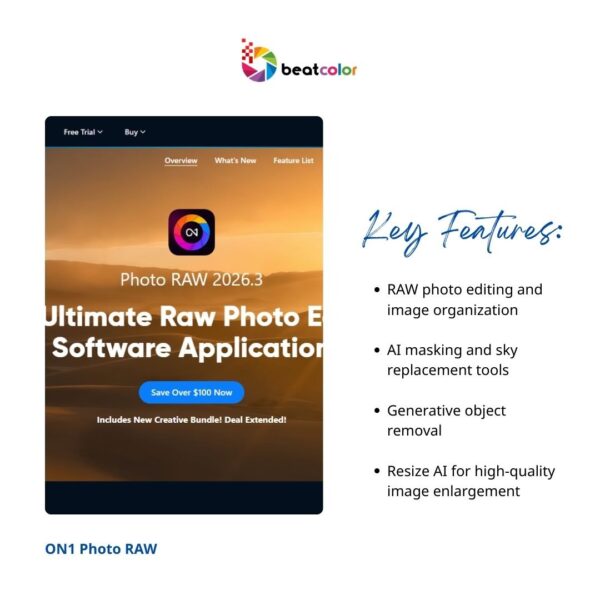
5. ON1 Photo RAW
ON1 Photo RAW is a powerful all-in-one photo editing software designed for photographers. It combines photo organization, RAW processing, and creative editing tools in one platform.
Because of this integration, photographers can manage and edit images without switching programs. This helps simplify workflows and save time during large editing projects.
The software also includes several AI-powered tools. For example, Sky Swap AI replaces skies quickly with realistic results.
Another useful feature is Generative Erase, which removes unwanted objects from photos. In addition, Resize AI enlarges images while preserving details and sharpness.
ON1 Photo RAW also provides many presets and creative filters. These tools help photographers create consistent editing styles across multiple images.
Key features include:
- RAW photo editing and image organization
- AI masking and sky replacement tools
- Generative object removal
- Resize AI for high-quality image enlargement
Because it combines many tools in one program, ON1 Photo RAW is a strong alternative to traditional editing software.
How to Choose the Right Photo Editing Software
Selecting the right photo editing software depends on your specific needs. Different tools serve different creative workflows.
Professional designers often choose Photoshop for its advanced capabilities. Meanwhile, photographers prefer Lightroom for efficient image management.
If automation is your priority, AI-driven tools like Luminar Neo may be ideal. For image restoration and sharpening, Topaz Photo AI performs exceptionally well.
Finally, beginners may find PhotoDirector easier to learn and operate.
Therefore, the best editing software depends on experience level, editing goals, and workflow preferences.
Final Thoughts
Photo editing software continues evolving alongside modern digital photography. Artificial intelligence, automation, and cloud collaboration now define the latest generation of editing tools.
The five platforms discussed above represent the strongest options available in 2026. Each offers unique advantages depending on the user’s needs.
Whether you are a professional photographer or a casual creator, powerful editing tools can elevate visual quality. Ultimately, mastering photo editing software helps transform ordinary photos into compelling visual content.
Read more:
Real Estate Video SEO Tips That Deliver Results
Real Estate Video Social Media in the Attention Economy
Real Estate Video Editing Services: The Competitive Advantage Agents Cannot Ignore